
Download Twitter Emoticons Tool – Chrome Apps, Twitter, Emoticons, Emojis, Fun, Social Media
Overview
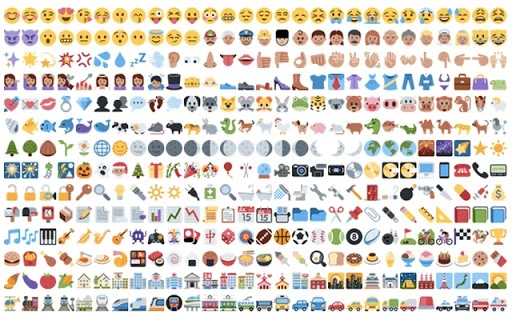
The Twitter Emoticons Tool is designed to enhance social media interactions by enabling users to incorporate a wide variety of Twitter-specific emoticons into their posts. These emoticons are represented by unique codes that users can copy and paste directly into their Tweets. The tool aims to make communication on Twitter more expressive and engaging, particularly for users who enjoy adding a playful or creative tone to their content. It is suitable for casual users, social media enthusiasts, and content creators who want to stand out in a crowded digital space.
By using this tool, users can quickly access a collection of emoticons that are compatible with Twitter’s platform, ensuring visibility across all devices and client applications. The solution is particularly useful for those who want to personalize their Tweets without relying on third-party apps or browser extensions. The developer did not provide additional details about the background or history of the tool, but its purpose is clear: to simplify the process of adding fun, expressive elements to Twitter content.
Key Features & Capabilities
- Comprehensive Emoticon Library – Offers hundreds of Twitter-specific emoticons accessible via simple code strings, allowing users to enrich their Tweets with expressive symbols.
- Copy-Paste Integration – Users can copy the emoticon code and paste it directly into any Tweet, ensuring compatibility with all Twitter clients and devices.
- Universal Compatibility – Emoticons are rendered correctly regardless of whether the recipient uses the tool or not, making them universally visible on Twitter.
- Simple, No-Setup Experience – The tool requires no installation or configuration, making it accessible immediately upon access.
- Focus on Fun and Creativity – Designed for users who want to add humor, personality, and flair to their social media presence.
These features allow users to experiment with visual expression in text-based communication. For example, a user might insert a code like :) or :-D to convey emotion, or use more elaborate codes for custom symbols. This functionality is ideal for social media managers, influencers, and casual users looking to increase engagement through playful content.
User Interface, Workflow & Performance
The user interface of the Twitter Emoticons Tool is minimalistic and straightforward, focusing on functionality over design. It presents a clean list of emoticon codes organized by category or alphabetically, enabling quick navigation. The layout prioritizes ease of use, with clear labels and direct copy options for each code.
Workflow efficiency is high, as the process involves selecting a code, copying it, and pasting it into a Tweet—no additional steps or software layers are required. This simplicity reduces friction and supports rapid content creation. The developer did not specify resource usage details, but based on the tool’s lightweight nature and file size, it is expected to operate with minimal impact on system performance.
Stability is assumed to be consistent given the tool’s static, code-based nature. No dynamic processes or background services are involved, which reduces the likelihood of crashes or errors. Performance observations are based on general software behavior patterns.
Compatibility & System Requirements
The Twitter Emoticons Tool is compatible with both Windows and Mac operating systems, making it accessible to a broad user base. It has a file size of 2.1 MB, indicating a lightweight footprint that does not strain system resources.
Exact system requirements were not listed. The tool does not appear to require specific hardware configurations or software dependencies, suggesting it can run on most modern desktop environments. Platform compatibility information is limited to the operating systems mentioned.
Pros and Cons
Pros
- Free to use with no hidden costs
- Lightweight and fast-loading (2.1 MB)
- Simple, intuitive interface with no setup required
- Works across all Twitter clients and devices
- Enhances Tweet expressiveness with a wide range of emoticon codes
Cons
- No official developer information provided
- Does not offer real-time preview of emoticons
- Requires manual copying and pasting of codes
- Limited to Twitter-specific emoticons, not customizable
- Not a standalone application; likely browser-based or web-accessible
FAQ Section
Is the Twitter Emoticons Tool safe to use?
The tool is described as a simple code repository with no executable components. Since it does not install software or collect data, it is considered safe for general use. However, users should only access it through trusted sources.
Can I use this tool offline?
Offline usage depends on how the tool is delivered. If it is a web-based utility, an internet connection is required. If it is a downloadable desktop file, it may be used offline after installation. The developer did not specify the delivery method.
Does the tool update automatically?
Automatic updates are not mentioned in the provided information. Users should check the official source for updates if available.
What kind of license does the tool have?
The license type was not disclosed. As it is offered for free, it may be distributed under a permissive or public domain license, but this cannot be confirmed without official documentation.
Is the tool compatible with all versions of Twitter?
Yes, the emoticons are designed to be universally visible across all Twitter platforms and clients, regardless of whether the recipient uses the tool or not.
Final Thoughts + CTA
The Twitter Emoticons Tool offers a straightforward, no-cost way to enhance the visual appeal of Tweets with a wide variety of expressive codes. While it lacks advanced features like previews or customization, its simplicity and compatibility make it ideal for users who value efficiency and universal visibility. It is particularly beneficial for social media content creators, casual users, and those seeking to add a fun element to their online presence.
Despite limited developer information and a basic interface, the tool delivers on its core promise: enabling expressive communication on Twitter. With no installation required and minimal system impact, it stands out as a practical utility for enhancing digital interactions.
Download Twitter Emoticons Tool now







